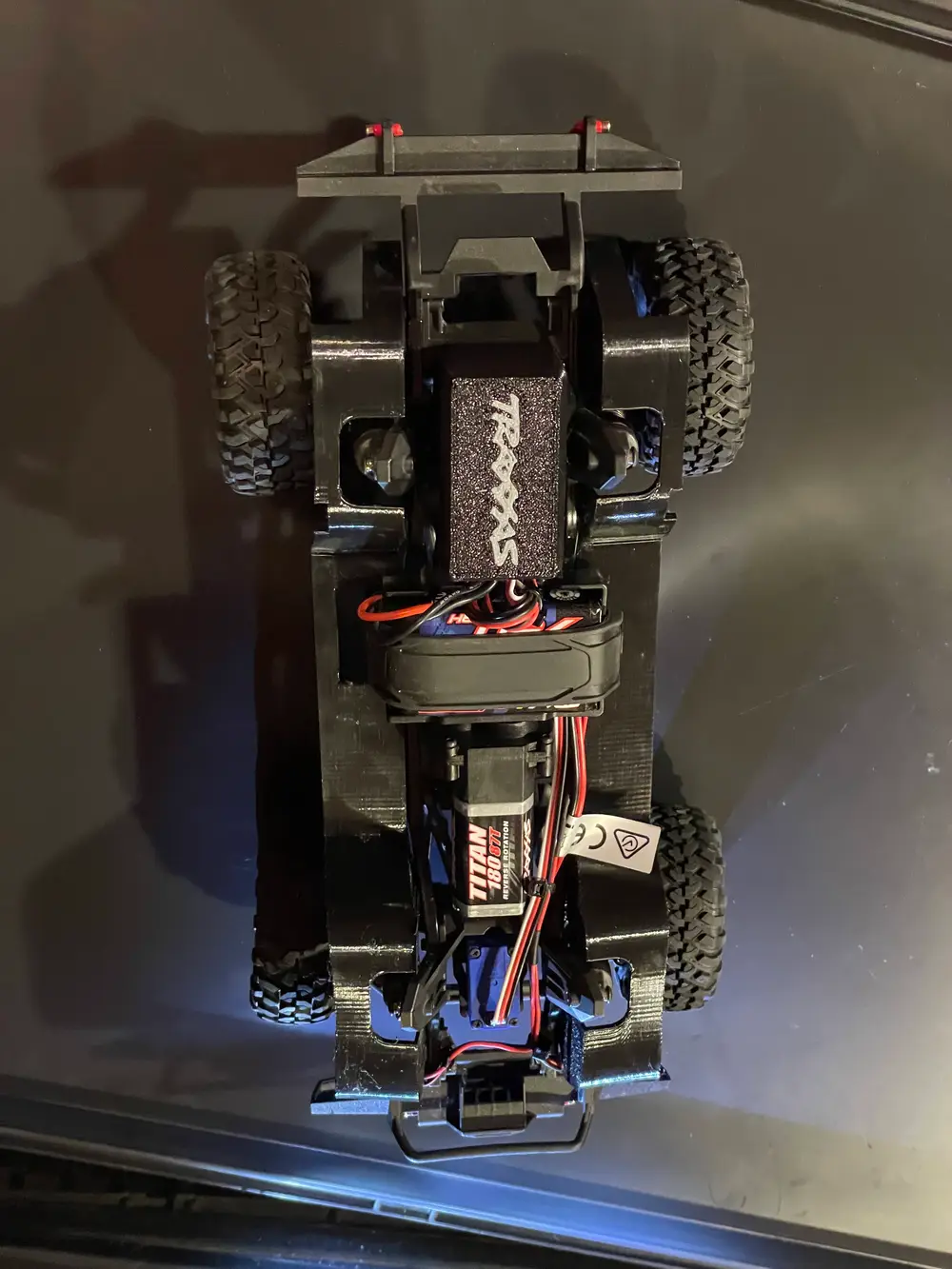
Dust and Moisture Cover for Traxxas TRX-4M Defender ESC


Description
This is a flexible dust and moisture cover designed for the stock ESC of the Traxxas TRX-4M.
The cover provides some additional protection for the electronics against dust, dirt and splashing water while leaving enough space for the cables.
It is not waterproof. Due to the cable opening, it should be considered a splash and dust cover rather than a sealed enclosure.
The cover uses a simple press fit. No screws, clips or cable ties are required. The flexibility of TPU provides enough grip to hold the cover in place while still allowing it to be easily removed when access to the ESC is required.
Compatibility
The cover was designed and tested on a TRX-4M Defender with the stock ESC.
It should also fit other TRX-4M models using the same stock ESC, but I have only tested it on the Defender.
Cable Management
There is a 12 × 2.5 mm cable opening on one side of the cover.
With a little cable management, all cables can be routed through this opening on the same side. This keeps the installation tidy and leaves enough room for the LiPo cable and the other connections.
Material
The cover was designed to be printed in TPU because the material needs some flexibility for the press fit to work properly.
The part shown in the photos was printed using Anycubic TPU 68D in black and gray.
TPU 68D is relatively stiff for TPU but still provides enough flexibility for the cover to stretch slightly during installation and grip the ESC.
I have only tested the design with this material, so the fit may differ when using significantly softer or harder TPU.
Two-Color Logo
The model shown in the photos was printed in two colors.
The Traxxas logo is embedded into the top surface. I imported the logo as an SVG into Anycubic Slicer Next and embedded it directly into the model.
Only the first few layers require two colors. After the logo has been completed, the remainder of the cover is printed normally.
The model can of course also be printed completely in one color. The cover will work exactly the same, just without the contrasting logo.
Print Orientation and Surface Finish
The cover is designed to be printed top side down, with the visible outer surface directly on the build plate.
This is intentional.
Using a textured PEI build plate gives the visible surface a nice, uniform texture and avoids visible layer lines on the top of the finished cover. The embedded logo also comes out nicely against the textured surface.
The part shown in the photos was printed with a 0.6 mm nozzle. The logo already comes out quite well, although a 0.4 mm nozzle should provide finer detail.
No Supports Required
The model is designed to print without supports.
The large opening faces upward during printing, and the geometry was designed with angles below 45 degrees.
There should therefore be no need to remove support material from the finished TPU part.
My Print Setup
The part shown in the photos was printed with:
- Printer: Anycubic Kobra S1 Max
- Material: Anycubic TPU 68D
- Colors: Black and gray
- Nozzle: 0.6 mm hardened steel
- Layer height: 0.24 mm
- Print mode: Low Noise Mode
- Filament system: ACE 2 Pro
- Chamber temperature: 38 °C
- Supports: None
- Build plate: Textured PEI
- Orientation: Visible top surface facing the build plate
The uploaded 3MF project contains the print setup and color assignments used for the print shown in the photos.
A hardened steel nozzle is not required just because of the TPU. I simply used the 0.6 mm hardened steel nozzle that was installed on my printer. A standard nozzle should be perfectly fine for standard TPU.
ACE 2 Pro and Chamber Temperature
Both TPU colors were fed directly through the ACE 2 Pro, including the automatic color changes for the logo.
No manual filament changes were required.
I used a chamber temperature of 38 °C, but this is not a requirement for printing this model or TPU in general.
There was a much simpler reason:
The room temperature was only about 8 °C. :-)
The heated chamber was mainly used to provide a more reasonable and stable printing environment in an unusually cold room.
Installation and Fit
Installation is simple:
- Arrange the ESC cables so that they leave the cover together through the 12 × 2.5 mm opening.
- Push the TPU cover over the stock ESC.
- The flexible walls provide the press fit.
There are no screws, clips or cable ties required.
The current version has been physically printed and installed on my TRX-4M Defender with the stock ESC and the LiPo cable connected.
The press fit is sufficiently tight and the cover stayed securely in place during my initial driving test.
Full disclosure: the test drive was only about 2 meters so far. :-)
So the fit has been tested, but I am not claiming extensive long-term, off-road or water-resistance testing yet.
About the Traxxas Logo
The Traxxas logo was based on an SVG I found online and imported into Anycubic Slicer Next. I removed the registered trademark symbol because the tiny detail was too fragile to print reliably at this scale.
I am not affiliated with Traxxas and do not own or claim any rights to the Traxxas name or logo.
The logo is used only as a decorative element on this hobby model.
Feedback
This is my first model uploaded to MakerWorld, so feedback is very welcome!